Your first app
Your first app
Create a module
mkdir hello && cd hello
go mod init example.com/hello
Write the app
Save this as main.go:
// The first app: a label and a button that changes it.
package main

import (
	"github.com/belluikit/bellui"
	"github.com/belluikit/bellui/app"
	"github.com/belluikit/bellui/container"
	"github.com/belluikit/bellui/widget"
)

func main() {
	a := app.New()
	w := a.NewWindow("Hello")

	hello := widget.NewLabel("Hello Bellui!")
	w.SetContent(container.NewVBox(
		hello,
		widget.NewButton("Hi!", func() {
			hello.SetText("Welcome :)")
		}),
	))

	bellui.ShowAndRun(w)
}
Reading it from the top:
app.New()creates the application. There is one per program.a.NewWindow("Hello")creates a window. Nothing is shown yet.widget.NewLabelandwidget.NewButtoncreate two widgets. The button’s function runs on the UI thread each time it is tapped, so it can update the label directly.container.NewVBoxstacks them vertically, andw.SetContentmakes the stack the window’s content.bellui.ShowAndRun(w)shows the window and runs the app’s event loop. It returns when the app quits, for example when you close the window. It is a function in thebelluipackage that takes the window, not a method on it.
Fetch the dependencies
go mod tidyRun this after writing the code, not before. go mod tidy adds exactly the
modules your imports need, and on an empty module it has nothing to go on.
Run it
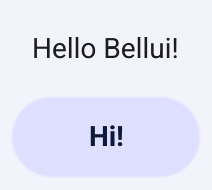
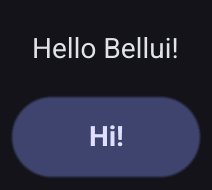
go run .A window opens with the label and the button. Tap the button and the label changes.
Try the mobile simulation
The mobile build tag runs the same program in a phone-sized window with
mobile behaviour, without a device or emulator:
go run -tags mobile .To run on a real phone, package the app with the bellui command; see
Packaging and distribution.
Where to go next
- Renderers: what WebGPU and the OpenGL fallback each need.
- Concepts: apps, windows, canvas objects and the UI thread.
- The gallery: every widget in one app.
Clone it and run
go run .to explore.